
Getting a GoChat account ready takes four steps: create the workspace, connect your WhatsApp number, invite your team and choose a plan.
1. Create your account
Sign up at gochat.ar and start the free trial. You don’t need a credit card.
The Free trial plan includes 1 bot, 200 bot users and 1 member. PRO features stay active for 14 days from the day you open the account. A trial account is deleted automatically after 3 months of inactivity.
2. Connect WhatsApp
For most businesses this is the most important step: until the number is connected, the bot can’t answer on WhatsApp.
Before you start, have these at hand:
- A Facebook account with admin access to your Meta Business Manager. If you don’t have a Business Manager, you can create one during the process.
- A Visa or Mastercard card for the WhatsApp charges. American Express is not accepted.
- A phone number that can receive an SMS or a call.
Then go to WhatsApp Cloud in the left-hand menu of the dashboard and click Connect WhatsApp Cloud. Which guide to follow depends on your number:
| Your number | Guide |
|---|---|
| Is new, or not used on WhatsApp | Set up a new phone from zero |
| Is already used in the WhatsApp Business app and you want to keep using the app | Connect your WhatsApp Business app (Coexistence) |
| Is already connected to the WhatsApp API on another platform | Set up if you want to migrate from another platform |
To message users after the 24-hour window you need approved templates: see Template messages. For everything else about the channel, see WhatsApp Cloud.
3. Set up your profile and your team
- Your own profile (photo, name, email and time zone) is in the menu under your name, at the top right.
- The workspace name, logo and time zone are in Workspace Settings → Profile.
- To invite your team and give each person a role, go to Workspace Settings → Members. Each plan includes a number of members; you can add more as an add-on.
4. Choose a plan and pay
Go to Billing in the left-hand menu of the dashboard. It has two tabs: Subscription and Billing History.
Plans
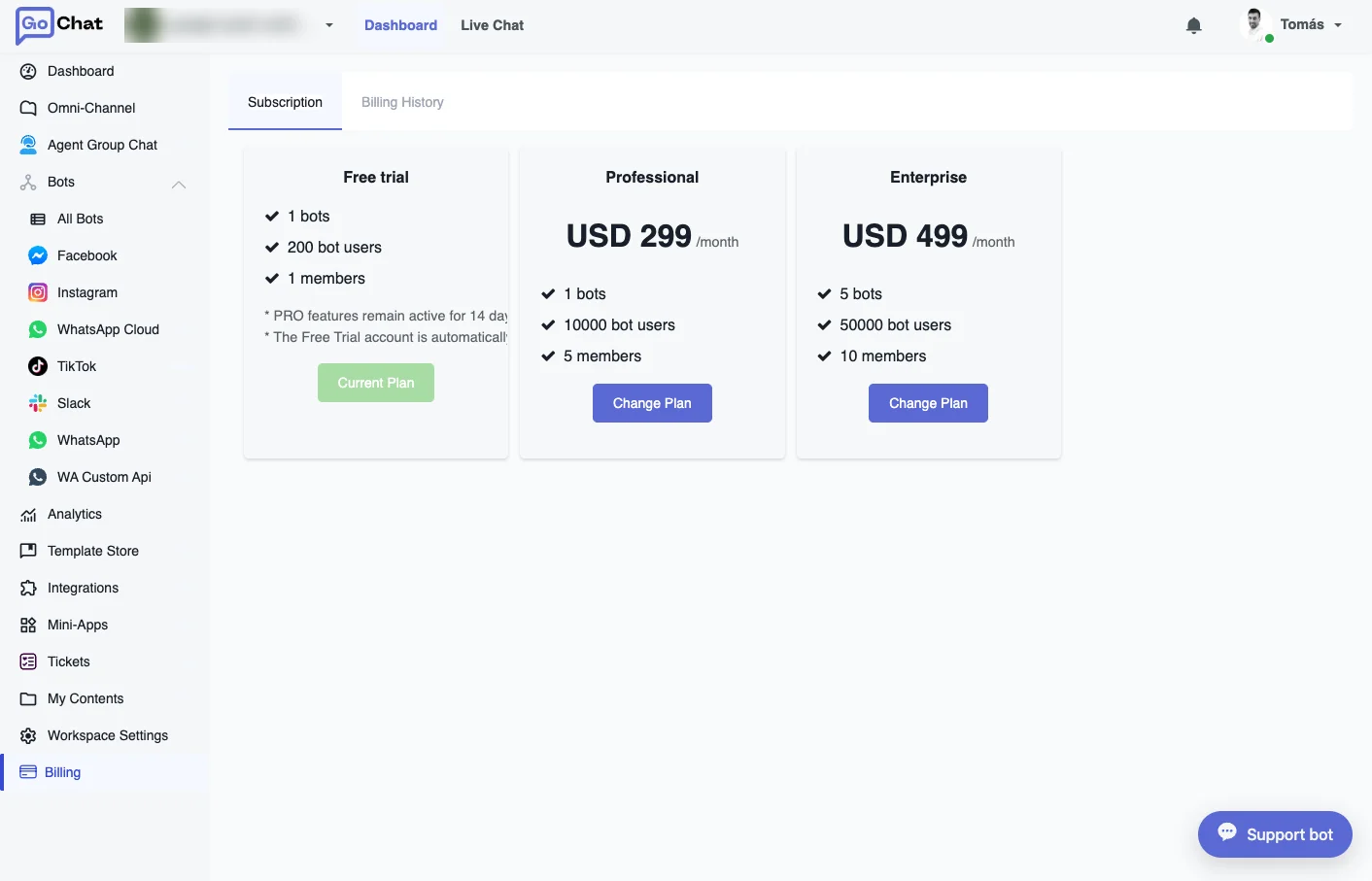
| Plan | Price | Bots | Bot users | Members |
|---|---|---|---|---|
| Free trial | Free | 1 | 200 | 1 |
| Professional | USD 299/month | 1 | 10,000 | 5 |
| Enterprise | USD 499/month | 5 | 50,000 | 10 |
For larger operations there is a Custom plan: contact GoChat to set it up. See Pricing for everything each plan includes.
To subscribe, click Change Plan on the plan you want. Payment is made by card through Stripe, inside GoChat. Before paying you have to accept the terms of service. Enterprise and Custom plans can also be paid by bank transfer.
Points and add-ons
GoChat uses points for renewals and add-ons: 1 point = 1 USD. You buy points through Stripe, from the Billing History tab.
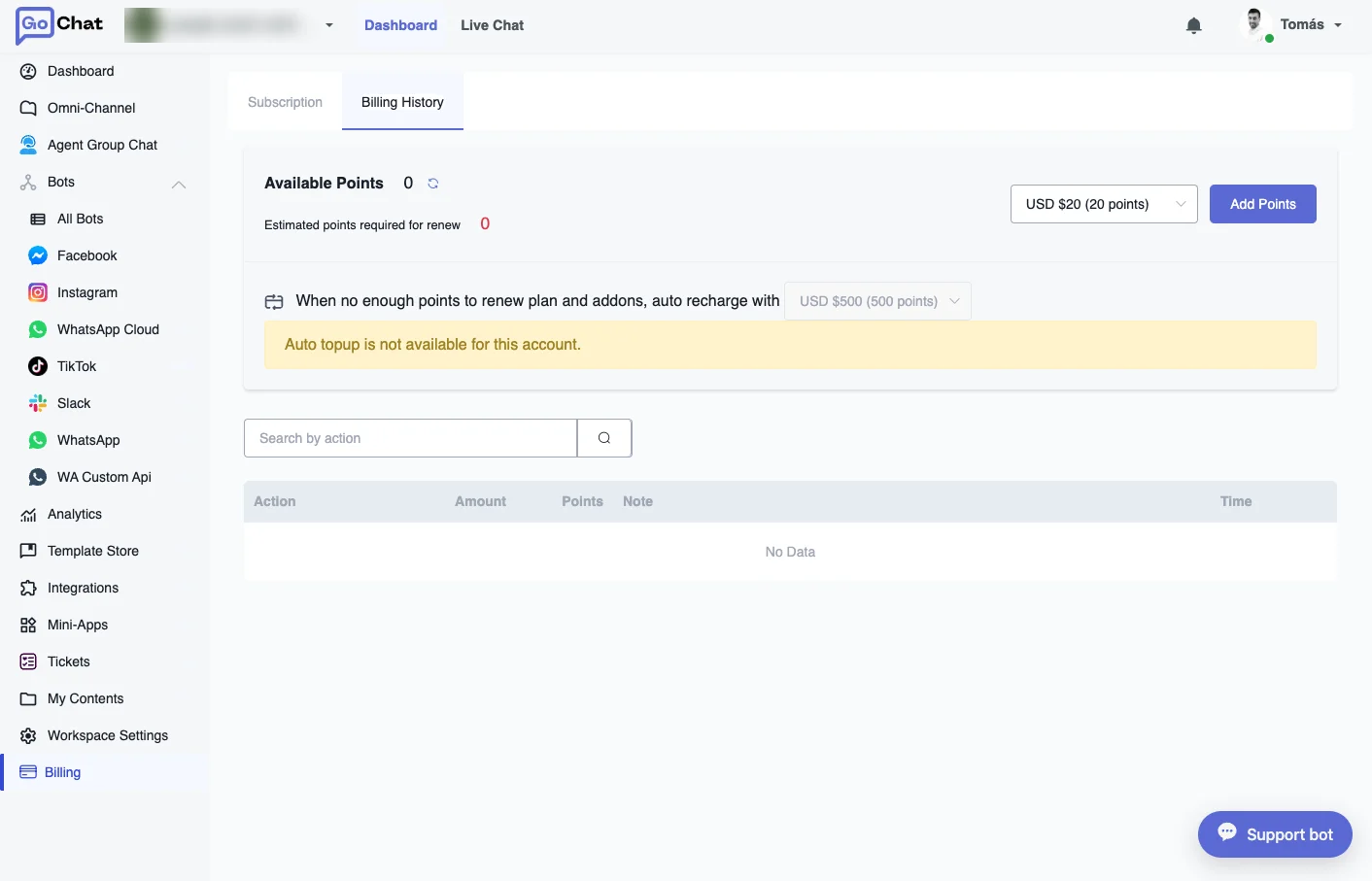
- Available Points shows your balance, and Estimated points required for renew shows how many points the next renewal needs.
- To buy points, choose an amount (USD 20, 100, 500 or 1,000) and click Add Points.
- Auto recharge: when there aren’t enough points to renew the plan and the add-ons, GoChat recharges the amount you chose automatically. Keep a valid card so the workspace doesn’t stop.
- The table below lists every movement: renewals, add-on changes and top-ups.
Add-ons let you raise one limit without changing plans. Their price is shown in points per month, for example:
| Add-on | Points per month |
|---|---|
| Extra channel or WhatsApp number | 40 |
| Extra member | 20 |
| Extra 1,000 bot users | 20 |
| Extra 10,000 bot users | 100 |
The full list, with the current price of each add-on, is in the app when you add one.
What happens when you reach a limit
If the workspace goes over the limits of its plan (bots, bot users or members), it is paused. To resume it you can:
- Upgrade to a plan whose limits cover what you use.
- Buy the add-on you need with points.
- Go back under the limits, for example by removing a member or a bot you don’t use.