
Booking Services manage appointments: consultations, demos, test drives or any service your users book. Each booking goes through a set of statuses, and GoChat sends the reminders before the appointment and the follow-ups after it.
Go to Contents → Booking Services. Booking services are shared by every bot in the workspace, up to 20. The triggers you set up belong to the bot where you set them up. The list shows each service with its id, whether it is active, its Service Uid, name, description and availability, for example “1 reminder · 1 followup”.
To use Booking Services, the workspace needs the add-on that includes bookings.
Create a booking service
Click + Booking Service. The form has six steps:
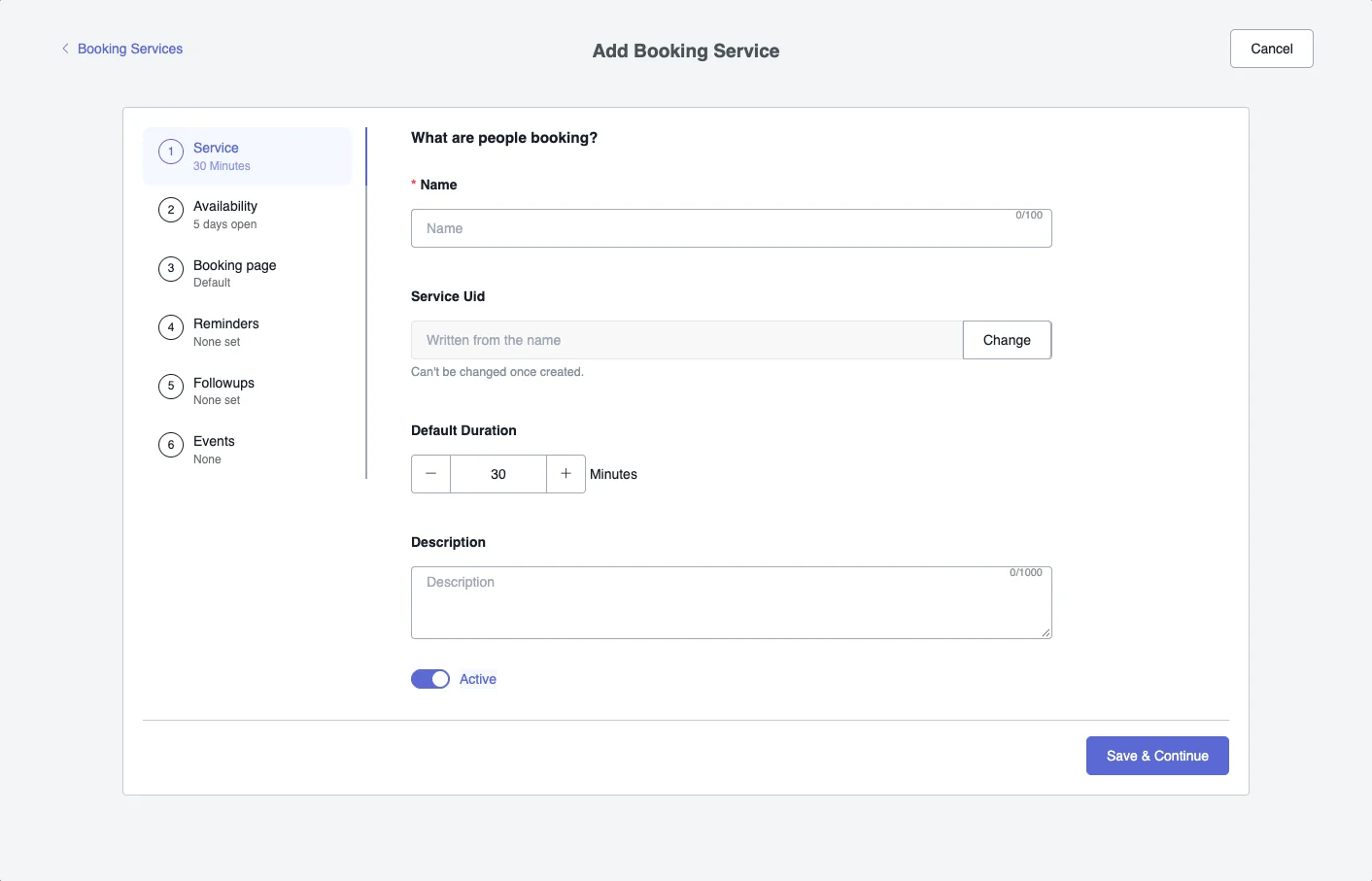
- Service: what people are booking.
- Name, up to 100 characters.
- Service Uid: the identifier you use in your flows. It is written from the name, and you can change it with Change before saving. It can’t be changed once created.
- Default Duration, in minutes. It starts at 30.
- Description, up to 1000 characters.
- Active, to turn the service on or off.
- Availability: the days and hours you take bookings.
- Booking page: the page where the user books.
- Reminders: up to 5 messages before the appointment. Each one has a title, a message and how long before the start it is sent, in days, hours and minutes.
- Followups: up to 5 messages after the appointment, with the same settings, counted from the end.
- Events: what happens in your bot at each moment of the booking.
Click Save & Continue to move to the next step.
Booking statuses
| Status | What it means |
|---|---|
| Pending | The booking was created and is waiting for confirmation. |
| Confirmed | The booking is confirmed. |
| In Progress | The appointment started. It changes on its own when the start time is reached. |
| Completed | The appointment ended. It changes on its own at the end time, or you can mark it. |
| Cancelled | The booking was cancelled. |
| No Show | The user didn’t show up. |
| Inactive | The service is no longer active. |
A booking can be confirmed, rescheduled, cancelled, marked as completed or as no show, and rated from 0 to 5. Rescheduling and cancelling ask for a reason. A booking that is cancelled, completed or marked as no show can’t change anymore.
Reminders and follow-ups
- Reminders are scheduled when the booking is created. If you reschedule it, the ones not yet sent move to the new time. If it is cancelled, the pending ones are cancelled too.
- Follow-ups are only scheduled when the booking is marked as completed or no show. Cancelled bookings don’t get follow-ups.
To see how your bookings are going, open the Booking Services report. See Operations.