
WhatsApp limits what you can send to a customer depending on when they last wrote to you. In a WhatsApp conversation, Live Chat shows a status above the reply box that tells you what you can send and whether it has a cost.
The two windows
- 24-hour customer service window: it opens every time the customer sends a message and restarts with each new message. Your replies do not extend it. While it is open you can send normal messages.
- 72-hour Free Entry Point (FEP) window: it applies when the customer came from an eligible Click-to-WhatsApp ad or a Facebook Page button. If you reply within 24 hours, the messages are free for 72 hours.
If the 24-hour window closes while the FEP window is still open, you can keep sending template messages for free, but not normal replies.
Statuses in Live Chat
| Status | What it means |
|---|---|
| Service messages charged · [time left] | The customer wrote in the last 24 hours. You can reply normally, but WhatsApp may charge for service messages. |
| FEP messages free · [time left] · Free-form allowed for [time left] | The customer came from an eligible ad or Page button and the 72-hour FEP window is active. Normal replies are available while the 24-hour window is open. |
| Template only · FEP messages free · [time left] | The 24-hour window closed, but the FEP window is still active. Templates are free, normal replies are not available. |
| Eligible FEP · Reply within [time left] | The customer came from an eligible ad or Page button. Reply within 24 hours to start the 72-hour FEP window. |
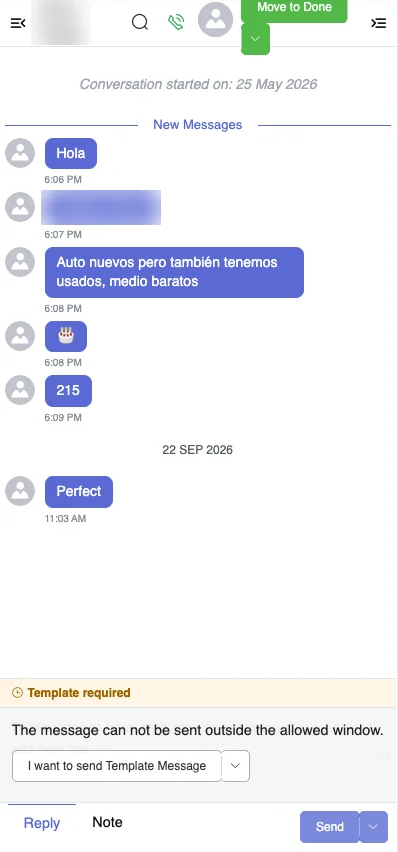
| Template required | Both windows are closed. Send an approved template or wait for the customer to write again. |
Use the windows in flows and filters
The condition step has three WhatsApp conditions:
- WhatsApp FEP pending: the customer can get the FEP window if you reply within 24 hours.
- WhatsApp FEP active (72h free window): the FEP window is active.
- WhatsApp FEP pending or active: either of the two.
Combine them with Has interacted in last 24h to choose between a normal message and a template. The same conditions are available as filters for bot users and Live Chat conversations.